Visual Monitoring
and Screenshot Comparison
Catch visual bugs before your users do. Automatically capture screenshots of your pages and compare them over time to detect layout breaks, CSS issues, missing images, or design changes.
No credit card required
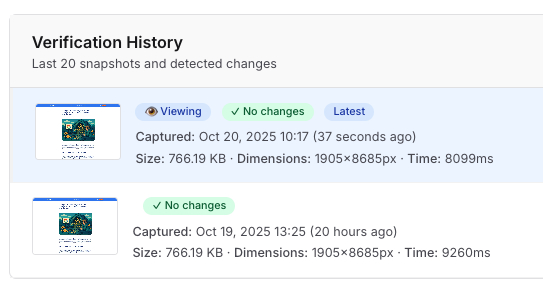
👆 Click to enlarge
How Visual Monitoring Works
Add Your Pages
Configure which pages to monitor. Choose desktop or mobile viewports, set frequency (hourly, daily, weekly).
Automatic Capture
PageRadar captures screenshots at your chosen frequency. Each screenshot is stored with timestamp and device information.
Get Instant Alerts
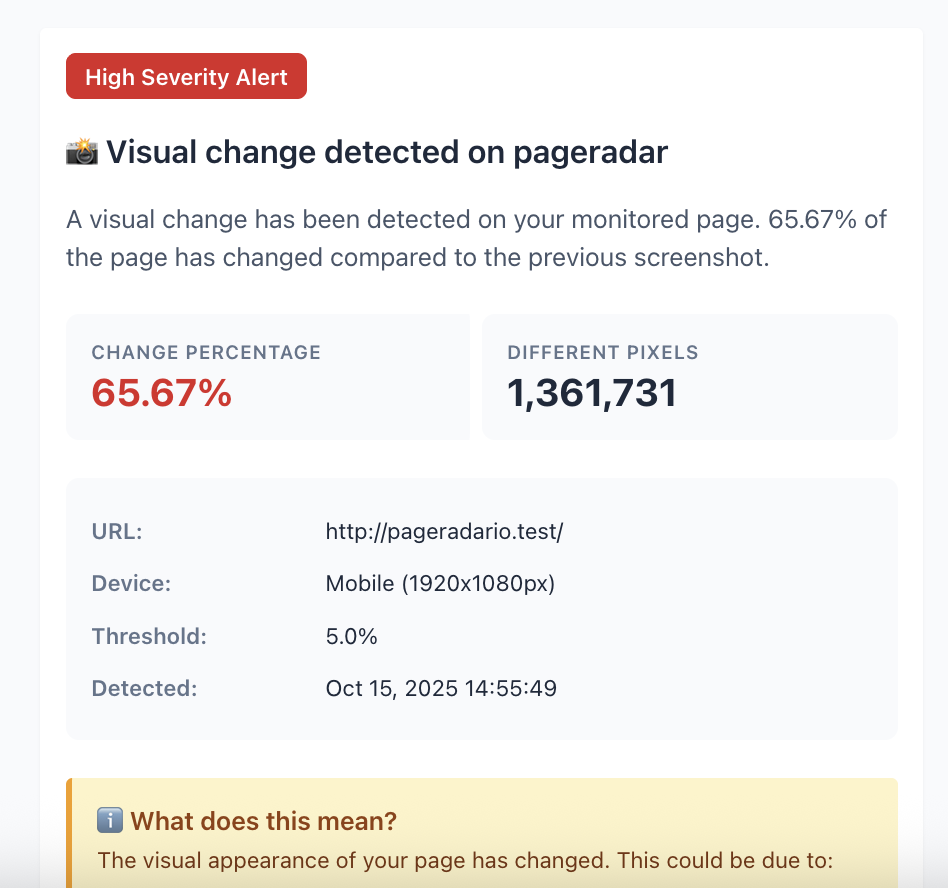
Receive immediate notifications when visual changes are detected. Compare screenshots side-by-side to identify changes.
Automated visual testing made simple
Automated Screenshot Capture
Stop manually checking your pages for visual bugs. PageRadar automatically captures screenshots of your pages at your chosen frequency (hourly, daily, or weekly).
- Desktop & Mobile screenshots (1920x1080 and 375x667)
- Full page capture
- Flexible frequency (hourly, weekly)
Intelligent Visual Diff Detection
PageRadar compares screenshots pixel-by-pixel to detect even subtle visual changes. Get notified instantly when changes occur.
- Side-by-side before/after comparisons
- Change percentage tracking
- Historical comparison with previous versions
Instant Alert Notifications
Never miss a visual bug again. Receive instant email notifications when PageRadar detects visual changes.
- Instant email alerts with screenshot comparisons
- Customizable thresholds
Why Choose PageRadar Over Manual Testing?
| Feature | PageRadar | Manual Testing | Percy/Chromatic |
|---|---|---|---|
| Automated Screenshot Capture | |||
| Desktop & Mobile Viewports | Manual effort | ||
| Instant Email + Slack Alerts | Limited | ||
| Pricing | From $39/mo | Time cost | From $149/mo |
| Setup Complexity | 5 minutes | Immediate | Requires CI/CD integration |
Simple pricing
Start Monitoring Your Pages Today
All plans include visual regression testing with screenshot monitoring. No credit card required. Cancel anytime.
Need Custom Pricing?
Large volume? Special requirements? We offer tailored solutions for enterprises and agencies.
- Volume discounts available
- Custom integrations
- Priority support
- Dedicated account manager
FAQ
Visual Monitoring Questions
Everything you need to know about our screenshot monitoring.
Visual regression testing is an automated technique that captures screenshots of your web pages and compares them over time to detect changes.
PageRadar captures full-page screenshots at your chosen frequency (hourly, daily, or weekly) and compares them pixel-by-pixel with previous versions. When changes are detected above your threshold, you receive notifications with side-by-side comparisons showing what changed.
Yes! PageRadar captures screenshots for both desktop (1920x1080) and mobile (375x667) viewports.
You can choose the monitoring frequency that you need : hourly for important pages that change frequently, daily for regular monitoring, or weekly for stable pages.
PageRadar allows you to set thresholds. You can configure what percentage of change triggers an alert, helping you focus on changes that matter, ignoring minor variations.